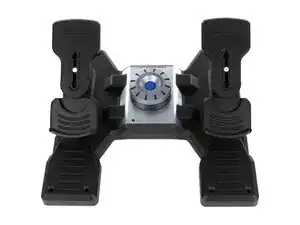
Background
The Flight Rudder Pedals are a desktop flight-simulator peripheral designed to provide independent left/right rudder control and toe-brake inputs for realistic aircraft control. They are built with durable materials including metal linkages and reinforced ABS or nylon-reinforced plastic housings to withstand extended use. Key features include adjustable tension/throw, non-slip footrests, and a USB interface for PC connectivity. The unit is intended for compatibility with a wide range of flight-simulation software and hardware ecosystems.
Identification
The Logitech Flight Rudder Pedals can be identified by the model number (M/N J-U0005). The model label is on the underside of the pedal base and by the USB cable and connector exiting the rear of the housing. This label lists the model (M/N), part (P/N), and serial (S/N) numbers.
Specifications
- Manufacturer: Logitech
- Model Name: Flight Rudder Pedals
- Release Year: 2015
- Materials: Reinforced ABS or nylon-infused plastic base, metal (steel/aluminum) linkages and shafts, rubber non-slip foot pads
- Connectivity: USB (wired) - standard USB A to device cable
- Sensors: Analog potentiometers (internal) for rudder and toe-brake axes (user-serviceable in many units)
- Key Switch Manufacturer: N/A (no keyboard switches present; uses analog potentiometers and mechanical linkages)
- Compatibility: Windows and macOS via standard HID/game-controller drivers; compatible with major flight-simulation titles
- Adjustability: Tension and travel adjustable via accessible screws/allen bolts; heel-rest and pedal spacing adjustments on some units
- Power: Bus-powered via USB (no external power supply)
- Dimensions (approx.): ~420 mm (L) × 260 mm (W) × 160 mm (H) — varies by production run
- Weight (approx.): ~3.5–4.5 kg depending on materials and internal hardware
Troubleshooting
Common repair-relevant faults include unresponsive or noisy axes (worn potentiometers), loose or broken linkages, and USB connectivity failures. Diagnose by checking OS game-controller calibration, testing continuity and voltage on potentiometer lines with a multimeter, inspecting and tightening mechanical linkages, and confirming USB cable/connector integrity.
For additional troubleshooting help, visit: Refer to Logitech Support (https://support.logi.com) for product assistance, warranty claims, and replacement guidance.
Additional Information
Warranty Info
See Logitech warranty page for region-specific limited warranty and claim procedures; warranty period varies by region.