Background
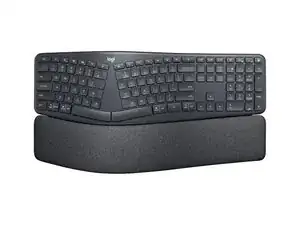
The ERGO K860 for Business is a full-size, split ergonomic keyboard designed to reduce strain with a curved keyframe and a pillowed wrist rest. It emphasizes durability with a reinforced plastic chassis, ABS keycaps, and a padded wrist rest built from resilient fabric and foam. Key features include a sloped, split layout for improved posture, multi-device wireless connectivity, and enterprise-grade wireless security (Logi Bolt). The design is intended for heavy office use and long-term reliability.
Identification
The Logitech ERGO K860 for Business can be identified by the model number (M/N CU0021). The model label is on the underside of the keyboard. This label lists the model (M/N), part (P/N), and serial (S/N) numbers.
Specifications
- Form Factor: Full-size split ergonomic keyboard with integrated pillowed wrist rest
- Layout: Standard full-size (numeric keypad) — 104-key QWERTY layout
- Switch Type: Logitech scissor/membrane "Perfect Stroke" keys (manufacturer not publicly specified)
- Connectivity: Bluetooth Low Energy and Logi Bolt USB receiver (enterprise wireless)
- Receiver Model(s): Not listed on the support page; enterprise kits commonly use Logi Bolt receivers (model numbers vary)
- Power: 2 × AAA batteries (user-replaceable)
- Battery Life: Up to 24 months (typical usage — actual life varies with usage and wireless mode)
- Materials: Reinforced ABS keycaps, high-strength plastic chassis, padded fabric/foam wrist rest designed for durability
- Spare Parts Availability: No spare parts listed for this product on the official support page
- Certifications: Regulatory markings and certifications (FCC/CE) listed on underside label; enterprise compatibility with Logi Bolt security
Troubleshooting
Common repair-relevant faults are unresponsive or sticky keys (often due to debris or scissor mechanism wear), connectivity/pairing failures, and tactile degradation of the wrist rest. Diagnose keys by removing keycaps to inspect for debris or broken scissor clips and test matrix continuity at the PCB; for connectivity, replace batteries and re-pair or test with the Logi Bolt receiver; inspect underside ribbon cables and connectors if keys or wrist-rest sensors are unresponsive.
For additional troubleshooting help, visit: Visit https://support.logi.com for product support, troubleshooting guides, and contact options.
Additional Information
Warranty Info
Warranty varies by region; consult Logitech's warranty page linked on the official support site for terms and claim procedures.