Background
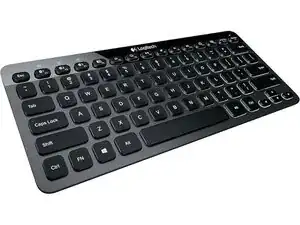
The BT EASY-SWITCH KBD (Logitech K811 family) is a compact Bluetooth multi-device keyboard designed for desktop and mobile use, featuring Easy-Switch buttons to pair and toggle between up to three Bluetooth hosts. Its top case uses durable anodized aluminum with a sturdy plastic base to balance rigidity and light weight. Key features include backlit keys with ambient light sensing, rechargeable battery via micro-USB, and a low-profile layout aimed at laptop-style typing. The keyboard prioritizes portability and multi-device workflow while using durable materials for long-term everyday use.
Identification
The Logitech BT EASY-SWITCH KBD can be identified by the model number (M/N Y-R0028). The model label is on the underside of the keyboard. This label lists the model (M/N), part (P/N), and serial (S/N) numbers.
Specifications
- Form Factor: Compact, low-profile wireless keyboard (similar to 75%/tenkeyless Apple-layout)
- Connectivity: Bluetooth (multi-device Easy-Switch, up to 3 devices)
- Backlight: Adjustable white backlighting with ambient light sensor
- Battery: Rechargeable Li-Po battery (internal) charged via micro-USB
- Materials: Anodized aluminum top case with ABS plastic base
- Switch Type: Low-profile scissor (membrane) switches — manufacturer not specified by Logitech in public documentation
- Dimensions: Slim profile; approximate footprint similar to compact Bluetooth laptop-style keyboards (exact dimensions vary by SKU)
- Weight: Lightweight portable design (approximately 300–400 g typical for compact aluminum Bluetooth keyboards)
- Supported OS: Windows, macOS, iOS, Android (key legends target Apple-layout variants)
- Pairing Buttons: Dedicated Easy-Switch keys to pair/switch between three Bluetooth devices
Troubleshooting
Common repair-relevant faults include battery failure (keyboard not powering on), failing backlight, and intermittent Bluetooth pairing. Diagnose by verifying charge/cable and testing battery voltage, performing a Bluetooth re-pair/reset, and inspecting the internal battery and USB charging port for corrosion or detached solder joints; key switch faults require removing keycaps and inspecting scissor clips and membrane layers.
For additional troubleshooting help, visit: For drivers, FAQs, and support visit Logitech Support (https://support.logi.com).
Additional Information
Warranty Info
Logitech typically provides a limited 1-year hardware warranty for keyboards; check your region and product registration for exact terms.