Background
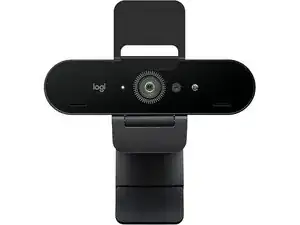
The BRIO STREAM is a 4K Ultra HD webcam from Logitech designed for live streaming, conferencing, and content creation. It offers high-resolution capture with HDR and adjustable field-of-view settings to suit a variety of streaming setups. The housing uses durable materials — a mix of reinforced ABS plastic and a metal mounting clip — built to withstand regular repositioning and travel. Key features include multi-resolution capture, built-in dual microphones, and compatibility with Logitech software for image tuning.
Identification
The Logitech BRIO STREAM can be identified by the model number (M/N V-U0040). The model label is on the underside near the mounting clip. This label lists the model (M/N), part (P/N), and serial (S/N) numbers.
Specifications
- Model Name: BRIO STREAM (Logitech 4K Ultra HD Webcam)
- ASIN / Retail SKU: B0748NCPN5 (Amazon listing ASIN)
- Maximum Resolution / Frame Rates: 4K Ultra HD (3840×2160) at 30 fps; 1080p at up to 60 fps; 720p at up to 90 fps
- Sensor and Image Processing: 4K-capable image sensor with HDR / RightLight imaging enhancements
- Lens: Glass lens with adjustable field of view (selectable ~65°, 78°, 90°)
- Microphones: Built-in dual omnidirectional microphones with noise reduction
- Connectivity: USB 3.0 compatible connection (camera-side cable with USB connector and included adapter for host USB-A ports)
- Mounting: Integrated adjustable monitor clip plus standard 1/4"-20 tripod thread
- Physical Materials: Reinforced ABS plastic housing with metal mounting clip and glass lens elements (durable construction for repeated use)
- Onboard Controls: Physical privacy shutter option on some SKUs; status LED for activity
- Software Compatibility: Works with Logitech software (Logi Options / Logi Tune) for image, FOV, and firmware updates
Troubleshooting
Common repair-relevant faults include USB cable failure, intermittent video (faulty cable or port), and microphone dropouts. Diagnose by testing with alternate USB ports/cables, checking the device in OS camera settings and Logitech software, and performing a continuity check on the cable; replace the cable or USB connector assembly if tests indicate failure.
For additional troubleshooting help, visit: Visit https://support.logi.com for downloads, firmware, and contact options; product gallery and support resources available there.
Additional Information
Warranty Info
See Logitech warranty page for region-specific terms; typical limited hardware warranty ranges from 1–2 years depending on region.