Background
The Dell Vostro 15 3558 was released in 2015 as part of Dell's budget-friendly business laptop series. The Vostro line was designed to balance affordability with serviceability, targeting small businesses and educational institutions and also positioned itself between consumer-grade Inspiron laptops and premium Latitude business models.
The target audience for the Dell Vostro 15 3558 includes small businesses, students, budget-conscious professionals, and home users who purchased this laptop between 2015-2018. As the device has approached its 10-year lifespan, current owners are primarily individuals seeking to extend their laptop's functionality through cost-effective repairs rather than purchasing expensive replacements. This audience typically has basic technical skills and values repair accessibility over professional service costs.
Identification
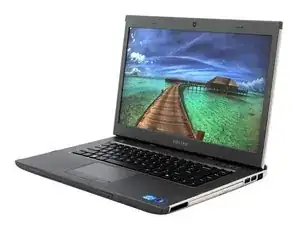
The Dell Vostro 15 3558 features a matte black plastic chassis, a non-backlit keyboard, and a single optical drive bay on the left side.
The laptop uses the service tag system P52F (P52F001). To identify your specific model:
- Check the bottom panel for a service tag sticker showing "Vostro 15 3558" or "P52F"
- Enter BIOS/UEFI (press F2 during boot) and check System Information
- Look for the model number on the original packaging or purchase receipt
- Verify the 15.6-inch screen size and release year (2015-2016)
Important Distinctions
Do not confuse the Vostro 15 3558 with similar models:
- Vostro 3550 (older 2011 model - incompatible parts)
- Vostro 3568 (newer 2017 - different motherboard)
- Inspiron 15 5558 (consumer version - some parts are cross-compatible)
if your service tag shows P52F or P52F001, you have the correct model.
Technical Specifications
Processor Options
- Intel Celeron 3205U (1.5 GHz)
- Intel Pentium 3825U (1.9 GHz)
- Intel Core i3-5005U (2.0 GHz)
- Intel Core i5-5200U (2.2 GHz)
Memory
- Type: DDR3L-1600 SODIMM
- Slots: 2
- Maximum: 16GB (8GB per slot)
- Default configurations: 4GB pr 8GB
Storage
- Interface: SATA III (6Gb/s)
- Form Factor: 2.5-inch
- Default: 500GB or 1TB HDD (5400 RPM)
- Upgrade compatible: Any 2.5" SATA SSD
- Note: No M.2 or NVMe support
Display
- Size: 15.6 inches
- Resolution: 1366 x 768 (HD)
- Panel Type: TN LCD
Battery
- Type: 4-cell Lithium-ion
- Capacity:40-47 WHr
- User-removable: Yes
Ports & Connectivity
- 1x USB 3.0
- 2x USB 2.0
- 1x HDMI
- 1x VGA
- 1x RJ-45 Ethernet
- SD card reader
- 3.5mm audio jack
Physical
- Dimensions: 380 x 260 x 23.65mm
- Weight: 2.3 kg (5.07 lbs)
Sources
NotebookCheck - Dell Vostro 15 3558 Notebook Review
Additional Information
Repair Guide & Troubleshooting
Parts-People Video Repair Guides - 25 step-by-step video tutorials for component replacement
Dell Official Service Manual (PDF) - Complete disassembly instructions with diagrams
Parts Compatibility & Specifications
NotebookCheck Technical Review - Detailed specifications, benchmarks, and upgrade potential analysis
Common Issues
- Battery degradation
- Slow performance from aging HDDs
- RAM limitations for modern software
Common Upgrades
- The battery can be replaced by using any Dell-compatible 40-47 WHr 4-cell battery
- The storage can be upgraded with any compatible 2.5" SATA SSD (such as the Samsung 870 EVO & Crucial MX500)
- The memory can be supported up to 15GB DDR3l-1600 (2x8GB modules)
Repairing and upgrading this laptop is economically sensible because replacement parts are affordable, repairs require only basic tools, and the laptop's modular design makes most repairs beginner-friendly. Users who repair instead of replace can save $400-$500 compared to purchasing a comparable new business laptop.
Cross-Compatibility Note
- Some components (keyboard, battery, RAM) are compatible with Dell Inspiron 15 5558